If you’ve ever wondered why one room in a building always feels stuffy while another stays fresh, or how architects decide where to place windows for natural airflow — the answer often comes down to fluid dynamics. And while the phrase ‘Computational Fluid Dynamics’ (CFD) sounds like it belongs in a PhD program, there are now tools that let curious beginners, students and designers explore these ideas without the steep learning curve.
2D airflow simulation offers a more approachable entry point. By simplifying airflow to a single flat plane, like a floor plan or a side-view cross-section, you can quickly visualize how air moves through a space, test different layout ideas and start building real intuition about ventilation, pressure and air quality. It won’t replace a full 3D engineering analysis but it’s a genuinely useful way to learn and explore early-stage design questions.
This guide walks through the core concepts, a typical workflow and some practical ways to use 2D simulation as a learning tool.
Why 2D Instead of 3D?
Traditional CFD is powerful but demanding. Setting up a 3D model requires detailed geometry preparation, mesh generation and often hours of solver time — plus a solid background in fluid mechanics to interpret the results meaningfully. That’s a lot of overhead just to understand, say, whether opening a second window would improve airflow in a classroom.
2D simulation trades some physical accuracy for speed and accessibility. The domain is a flat cross-section, the mesh is simpler, and results can appear in minutes rather than hours. You lose some real-world complexity — vertical stratification and certain turbulence effects don’t translate well to 2D — but you gain the ability to run quick experiments and actually see cause and effect in near real time.
This makes it well-suited for learning, conceptual exploration, and early design screening, even if it’s not the right tool for final engineering sign-off.
A Few Core Concepts Worth Knowing
You don’t need to be a fluid dynamics expert to get started, but a handful of ideas will make your simulations much more interpretable.
Geometry input is where you define the space. Most 2D tools let you sketch walls and obstacles directly, or import a floor plan image and trace over it. The geometry tells the solver where air can and can’t go.
Boundary conditions are what drive the simulation. They specify what’s happening at the edges of your domain — incoming wind speed and direction, open outlets, or fixed inlet velocities. Some tools support more realistic profiles, like an Atmospheric Boundary Layer (ABL) setup that varies wind speed with height, which is closer to how outdoor wind actually behaves.
Special zones let you represent real-world elements without drawing every physical detail. Two common ones:
- Porous zones model resistance to airflow — vegetation, window screens, filters, or crop rows in a greenhouse. Parameters like Leaf Area Index can quantify how much they impede flow.
- Blower zones inject air at a set speed and direction, standing in for fans, vents, or HVAC diffusers.
Solver outputs are where the learning happens. Velocity vectors show where air is moving fast or slow. Streamlines trace the actual paths airflow takes through your space. Pressure contours reveal where air is pushing hardest. Some tools add particle tracking, which can illustrate how something like PM2.5 or a contaminant might disperse.
A Typical Workflow
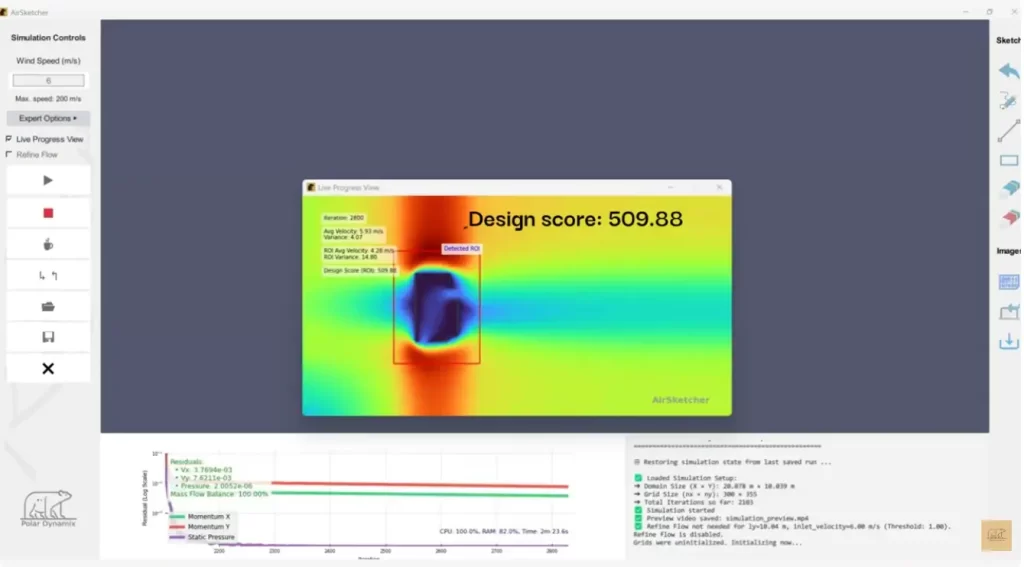
The exact steps vary by software, but a general 2D airflow workflow looks something like this.
Start with the geometry. Open a new project and either sketch your space — walls of a room, a greenhouse, a simple building section, or import a floor plan image and trace the key features. Keep it simple at first.
Set your boundary conditions. Define incoming wind speed and direction. If the tool supports it, consider whether a uniform inlet or a more realistic atmospheric profile better matches your scenario.
Add zones if needed. Draw porous areas to represent plants or screens, or blower zones for fans. Assign parameters based on your scenario — this is where a bit of domain knowledge helps, but even rough estimates can reveal useful trends.
Run the simulation. Because the domain is 2D and meshing is usually automated, solve times are typically short. Most scenarios resolve in a few minutes.
Read the results. Look at where air circulates well and where it stagnates. Follow the streamlines. Are there recirculation zones behind obstacles? Does airflow reach the far end of the space? These patterns are where the real learning happens.
Iterate. Move a window, add a partition, change wind direction, and re-run. The rapid feedback loop is probably the biggest advantage of 2D simulation as a learning tool — you can develop intuition quickly by experimenting.
As a simple example: sketch a classroom with windows on one side and a door on the other, set a moderate outdoor wind, and run it. The streamlines will likely show you clearly whether the layout creates good cross-ventilation or just a swirling dead zone in the corner. Add a fan as a blower zone and re-run to see what changes. The results might reveal areas of good fresh-air circulation and pockets of stagnant air, helping you see how window placement or furniture arrangement affects ventilation.
Where This Kind of Tool Gets Used
2D airflow simulation shows up in a range of learning and exploration contexts.
Fluid dynamics education. Abstract concepts like recirculation, pressure gradients, and the Venturi effect become much more concrete when students can sketch a scenario and watch it play out. It lowers the barrier to hands-on experimentation without requiring full CFD expertise.
Ventilation and indoor air quality. Early-stage exploration of natural ventilation strategies, HVAC outlet placement, or pollutant dispersion in homes, schools, or offices. Useful for understanding sensitivity to design choices before committing to anything.
Architectural and sustainable design. Testing how layout changes affect thermal comfort and energy efficiency, using real prevailing wind data as input.
Agricultural and environmental applications. Modeling airflow through greenhouses, around crops, or in livestock housing — particularly relevant for understanding how ventilation affects plant health or animal welfare.
Research and academic projects. Some university research groups use 2D simulation tools as lightweight complements to more detailed studies, especially in indoor environmental quality work.
How to Get the Most Out of It as a Learner
A few habits that make the learning more effective:
Start with simple geometries. One room, one inlet, one outlet. Get comfortable with how the results look before adding complexity.
Document your assumptions. Note the wind speed, the scale of your geometry, and any zone parameters. It makes it much easier to compare runs and to sanity-check results against hand calculations.
Interpret critically. 2D is an approximation. Use it to understand trends and sensitivities, not to generate precise real-world predictions. If a design change makes airflow noticeably better in 2D, that’s worth paying attention to — but always validate with more rigorous methods before acting on it in the real world.
Connect it to theory. Cross-reference what you see with basic fluid dynamics principles — Bernoulli’s equation, the continuity equation, mass conservation. When simulation and theory agree, your confidence in both goes up.
Treat each run as an experiment. Change one thing at a time and ask yourself what you expected to happen, then compare it to what you actually see. That gap — between expectation and result — is often where the most interesting learning happens.
A Note on Available Tools
There are a handful of 2D airflow tools aimed at different audiences. AirSketcher, made by Polar Dynamix, is one commercial option — it’s built on an engineering-grade CFD solver but wraps it in a simplified 2D workspace designed for sketching or tracing floor plans. It’s worth mentioning mainly because it’s one of the more accessible options for people who want real solver results without setting up an OpenFOAM environment from scratch. It’s commercial software with a lifetime license model, so not free but the official YouTube tutorials and user manual from Polar Dynamix are a reasonable place to start if you want to see what a tool like this actually looks like in practice.
For those who want open-source routes, introductory OpenFOAM tutorials and university lecture notes on CFD fundamentals are widely available online, though the learning curve is steeper.
Wrapping Up
2D airflow simulation probably won’t replace a full engineering analysis for anything with real stakes. But as a learning tool — for students, architects, curious designers, educators, or anyone who wants to develop intuition about how air actually moves through spaces — it’s genuinely useful. The ability to sketch an idea, run it in a few minutes, and immediately see what works and what doesn’t is hard to replicate with theory alone.
The most meaningful outcomes tend to come when you pair it with solid fundamentals: understand why the streamlines do what they do, and you’ll get far more out of each run than if you’re just pushing buttons and watching the colors change.
Further reading: For broader context, look into indoor air quality standards, natural ventilation guidelines (ASHRAE 62.1 is a good starting point), and introductory texts on fluid mechanics. If you’re curious about the CFD side, the OpenFOAM documentation and community forums are extensive, if dense.